> For the complete documentation index, see [llms.txt](https://modern-stoic-ai.gitbook.io/hypertrade-docs/llms.txt). Markdown versions of documentation pages are available by appending `.md` to page URLs; this page is available as [Markdown](https://modern-stoic-ai.gitbook.io/hypertrade-docs/agent-hyper-chat-workspace.md).
# Agent Hyper – Chat Workspace
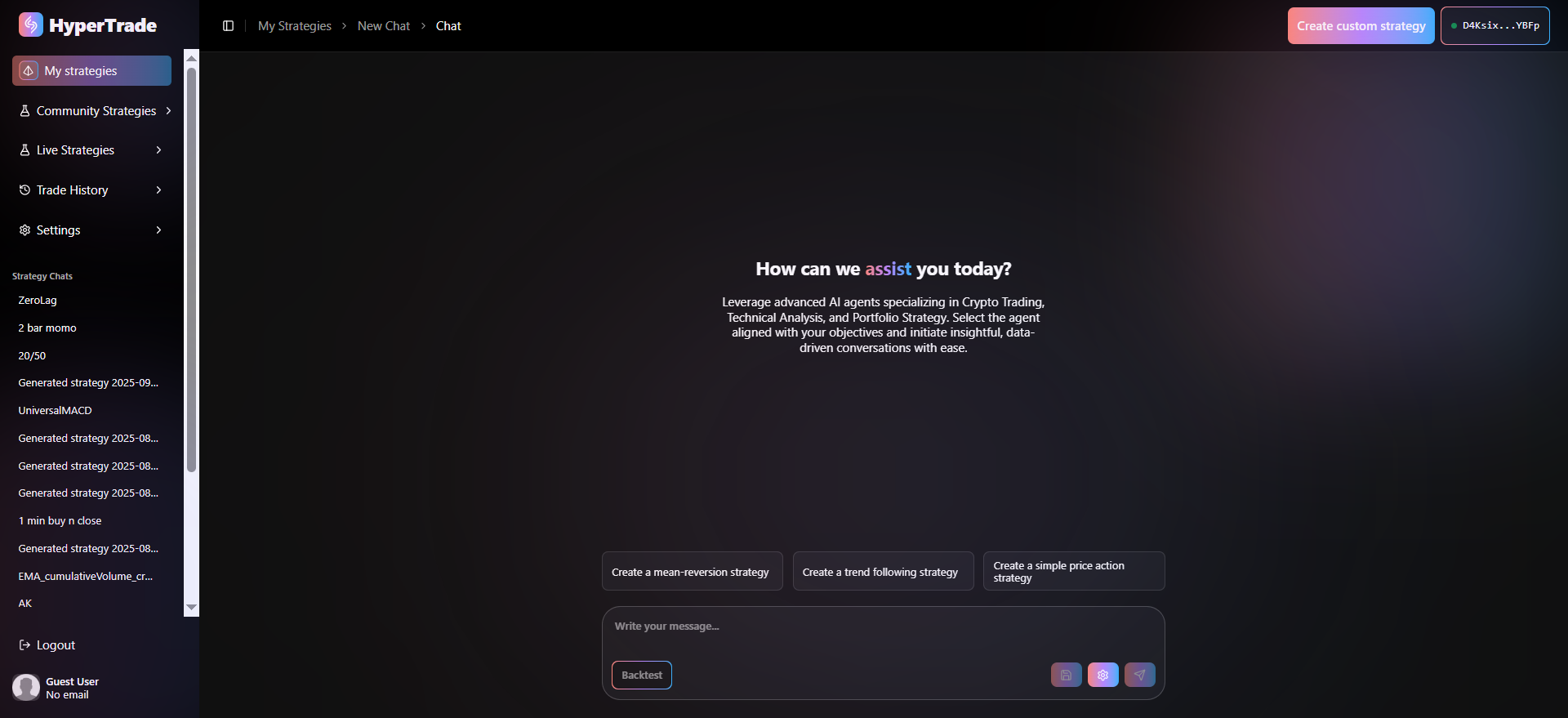
Welcome to the **Agent Hyper Workspace** inside **My Strategies**. Here you can hold a natural-language conversation with HyperTrade agents, iteratively design or refine trading ideas, and run instant back-tests without ever leaving the screen.
To enable the Agent Hyper, click the **Hypertrade** from the title bar or click the **Create custom strategy** button.
### **Page anatomy**
| **Area** | **What it’s for** |
| -------------------------------------- | ------------------------------------------------------------------------------------------------------------------------------------------------------------------------------------------------------------------------------------------------------------------------------------------------------------ |
| **(A)** **Navigation bar** | Jump between ***My strategies**, Community Strategies, Live Strategies, Portfolio, Trade History, Settings, Strategy Chats, Logout*. |
| **(B) Breadcrumbs** | Shows the current path—My Strategies › New Chat › Chat. Click any part to move back up. |
| **(C) Chat list panel** | All chats attached to this strategy. Select one to reopen it or press **Add new chat** to start fresh. |
| **(C) Conversation canvas** | The main chat area. Responses from HyperTrades specialised sub-agents (Crypto Trading, Technical Analysis, Portfolio Strategy) appear here. |
| **(D) Quick suggestions** | One-click prompts (*Create a mean-reversion strategy*, *Create a trend-following strategy*, *Create a simple price-action strategy*) to bootstrap a chat. |
| **(E) Message bar** | Write or paste your own prompt. Press **enter key** to send or the **paper-plane** button on the right. |
| **(F) Actions buttons - bottom right** |
Backtest — runs the strategy against historical data
Save — persists the conversation & generated code
⚙︎ Configure — opens back-test settings (time-frame & max open trades)
Paper-plane - send current prompt
|
### **Using the workspace**
#### **Start or reopen a chat**
1. Click Add new chat or pick an existing thread in the panel.
2. The conversation canvas welcomes you with:
“How can we assist you today?
Leverage advanced AI agents specializing in Crypto Trading, Technical Analysis, and Portfolio Strategy. Select the agent aligned with your objectives and initiate insightful, data-driven conversations with ease.”
#### **Ask a question**
Option A – click one of the purple quick-suggestion pills.
Option B – type your own prompt in the message bar and hit **enter key**.
*HyperTrade routes the request to the most relevant sub-agent and returns code snippets, trade logic or commentary.*
{% embed url="" %}
\
**Configure back-test parameters**
1. Press the **⚙︎ Configure** button (bottom right).
2. Pick a **Timeframe** (e.g. \_5 m, 1 h, 1 Day).
3. Set **Max Open Trades** (how many simultaneous positions the bot may hold).
4. Select **Assets** from the drop-down selection.
5. Click **Save** – these settings are stored with the chat and used for future back-tests.
#### **Run a back-test**
After generating or editing strategy code in the chat:
1\. Press Backtest.
2\. HyperTrade sends the current code, time-frame and trade limits to the
backend.
3\. Progress updates stream in real-time; when complete you’ll see
profit-curve, draw-down and key metrics in a separate page.
4\. If issues are detected, ask the AI to revise the code and back-test again.
#### **Save your work**
Hit **Save** any time. The full dialogue, code versions and test results are written to your personal library under the enclosing strategy*.*
{% embed url="" %}